Showing posts with label open alternatives. Show all posts

Friday, November 09, 2018

Open alternatives to privative software (XII): GIMP, the graphics editor

You need GNU/Gimp if you need edit a photo or any image.
The GIMP is a very powerfull tool, at least as much as the most well known and you needn't pay a lot of money for a licence and you have the guarantee than it's open source.
Anyway, as any other software, you need a good manual or a course to learn of the possibility.

Some of its feautures:
  • Multisystem: there are Windows, Mac (now full native), GNU/Linux y much more other unixes versions.
  • Most GNU/Linux distros includes GIMP installed of included in their official repositories.
  • Can import from or export to almost all graphics format.
  • This is open source and also free software, you needn't pay expensive licences.
  • You can do a lot of things with layers, make an animated GIF, images for different scenarios, etc...
Sice 2.8.x version was launched you can work in an unique window or not.
This version requires a pentium 4 processor at least and Windows version must be runned al least in Windows XP with service pack 3.


If our computer hasn't the minimal requirements (our PC must be older than 15 years old) we can use the older versions. They have most of the feautures with less requirements.

You can see professional possibilities and works in youtube, these videos will surprise you.

Original article

Sunday, September 23, 2018

Open alternatives to propietary software (XI): double panel explorers (NC clones)

Double panel explorer, similars to old Norton Commander in DOS, are very easy to use and useful to navigate in different devices and paths (HDD, DVD-ROM, etc...).

There is a lot of clones of NC and a lot of them are open source, these are my recomendations:

mc (midnight commander)

The ideal solution for browsing the GNU/Linux paths from the console, it is one of the first programs I install in any distro.


You can install it from your distro software center or from console with these commands as root:
apt-get install mc # Debian, ubuntu or similar
yum install mc # Red hat, Centos, Fedora or similar

gnome-commander

Very useful in gnome or any other graphic enviroment.


You can install it from your distro software center or from console with these commands as root:
apt-get install gnome-commander mild # Debian, ubuntu or similar
yum install gnome-commander # Red hat, Centos, Fedora or similar

All these software can do, at least, these operations with files and folders: copy, move, delete, edit, search content, change permissions and ownership and much more.

But there is a lot of open source clones I still don't prove it.

Original article

Monday, July 23, 2018

Open alternatives to propietary software (X): web browsers

Any open web browser is the best option to surf in the web with security, especially since the vulnerabilities are discovered very soon and corrected right away, using a private one is like playing Russian roulette.
These are some of most well-know:
  • Mozilla Firefox, one of the more used web browsers in the World. It's a powerfull and secure web browser.
  • Google Chrome another open source web browser, but made by google and apparently it monitors us while we use. There are a lot of people, including myseft,  that doesn't like this circustance.
    But again the advantages of free software are evident in this case, doesn't like how this web browser works? No problem, we made a fork: Chromium... but in this case Chrome is the fork than add spy code.
  • Chromium this is handled the same as google chrome but without that disturbing monitoring and works with most chrome plugins, it is also very fast and secure.
  • Other less known web browsers are Midori, SeaMonkey, etc
All of them are available for Windows, Mac and GNU/Linux, in the last case we do not even have to install Firefox because it usually comes standard on all distros, for something will be.

Artículo original en castellano

Thursday, May 31, 2018

Open alternative to propietary software (IX): ClamWin/ClamAV the open source antiviral software

Windows users need an antiviral software to get a minimal security, although given how vulnerable this system none of them is completely effective.
Privative antivirus usually eat a lot of resources of your computer, run for a short time because the licence expires and requires more money to update it (an non-update antivirus is useless), dirts your system, complete uninstall is very difficult, etc...
Clamwin is a different antiviral software: it can run on a pentium II without hang it, you can update the database viruses everyday and free and you can uninstall when you like as any other Windows software and it's open source.

The fact that it is a free program is a guarantee against suspicions, more judicious than paranoid, about the true intentions of most antiviruses and to what extent they protect or are part of the problem: a free antivirus does not benefit as much from the proliferation of viruses as the private ones that make their business go very well.
There is also a GNU/Linux version called Clamav.
I personally do not see any sense to have an antivirus in a system in which viruses do not pass theoretical experiments without practical danger.

You can keep safe your GNU/Linux updating the system and a bit of common sense.
Artículo original en castellano

Monday, April 30, 2018

Open alternatives to propietary software (VIII): Transmission, the bittorrent client

Transmission is the bittorrent client included in a lot of GNU/Linux distros.
You only need open a .torrent file and the software add the petition to the queue.
You can run Transmission and work with your computer as usual because this software doesn't cannibalize your computer resources like other bittorrent clients.


Are still anybody than says that GNU/Linux is not easy?
Artículo original en castellano

Friday, March 16, 2018

Open alternatives to privative software (VII): Libreoffice.org, the office suite

There is a lot of user that needs a computer just for use a web browser and a simple office suite.

These use can work with GNU/Linux without a great effort, and they keep reading all the files the had in office formats using LibreOffice.
This office suite is included in most GNU/Linux distros and also can read visio and pdf files and much more formats.
Available for a lot of systems (i.e: Windows and OSX) and there isn't any real reasons that avoid change to LibreOffice.org

Artículo original en castellano

Tuesday, February 06, 2018

Open alternatives to privative software (VI): evince, the PDF reader

Adobe reader users see this software get bigger and bigger, now is an enormous monster just for reading pdf files.

Fortunately there are a lot of alternative programs that can do this work with a few sizes and more reasonable requirements for this simple mission.
 Evince is one of them, the pdf reader included in most new GNU/Linux distros.
This software open files much faster because it is light software.

Can read all these formats:
  • PDF
  • Postscript
  • djvu
  • tiff
  • dvi
  • XPS
  • SyncTex support with gedit
  • comics books (cbz, cbr, cb7 and cbt)
Available in a lot of languages:


This an exclusive GNU/Linux software and a good reason to join to tux, anyway there is a lot of alternatives for other systems.Artículo original en castellano

Saturday, January 06, 2018

Open alternatives to propietary software (V): Audacity: audio software for multi-track recording and editing

Audicity is the best program to digitize audio in your computer, the perfect tool for this task:
  • Multisystem: available for GNU/Linux, Windows and Mac.
  • Light but very powerful.
  • Multi-track.
  • Easy to use. Intuitive.
  • The size limit of your file is the free space in your hard disk, other propietary software need save temporal in memory because are too slow, when out of memory these programs hang.
  • You can export to wav, ogg vorbis and mp3.
  • You can add more features with  plugins and libraries like use other formats like older retrocomputers ones.

Audacity
Artículo original en castellano

Friday, December 08, 2017

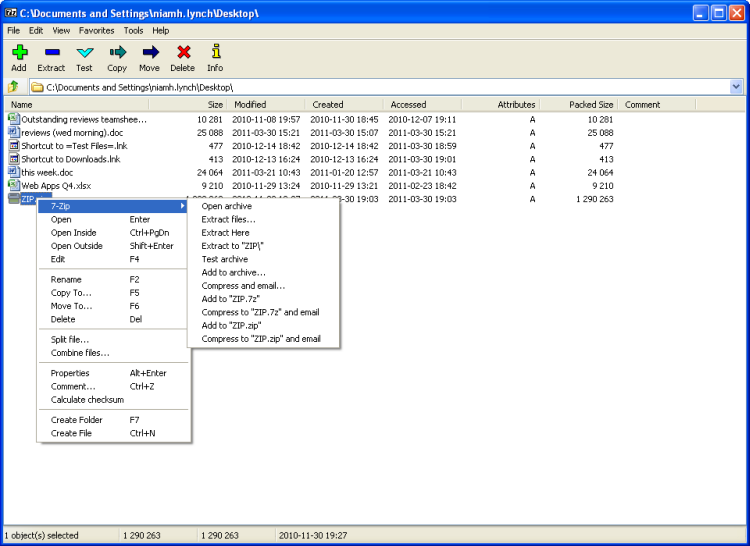
Open alternatives to proprietary software (IV): 7zip compressor/uncompressor

There are a lot of open compressing software, one of them is 7zip
  • Multisystem: available for Windows, GNU/Linux, Mac, Amiga, BeOS, DOS, Solaris, etc...
  • Support almost all compressing formats and it has an own one than compress the files very well.
  • It can open iso, cab, msi, linux packages, etc...
  • Very light, 1 or 2 Mb.
  • You can use it in your mother tongue, available 79 languages.
If you use ubuntu or debian install p7zip, p7zip-full y p7zip-rar packages and you can open almost all the files.
You can install it with the software center of your distro or from console with the commands:
apt-get install p7zip p7zip-full  p7zip-rar
Artículo original en castellano

Monday, November 06, 2017

Open alternatives to proprietary software (III): UMplayer, the multimedia player

UMPlayer is an open source multimedia player with a lot of advantages:
  • Multisystem.
  • Plugins included inside. If it hangs for a buggy file the system doesn't hang.
  • I can play almost any multimedia file.
  • Adapted to your PC hardware, processor and graphics card.
  • Subtitles support is included.
  • It can play DVD, VCD, CD from the device or the files copied in a folder.
  • Supports TV, radio and videocast.
  • It can play youtube videos.
UMPlayer was my prefer multimedia player for a long time.


Artículo original en castellano

Thursday, October 12, 2017

Open alternatives to proprietary software (II): Inkscape, the SVG editor

Inkscape is a marvellous softwate to make vertorial graphics, it use SVG open format, a standard than most software manage, including web browsers.
  • Available for multiple operating systems.
  • Very stable and light.
  • Compatible with other software.
  • Manage PDF files.
  • There is a lot of documentation to take advantage of the software.
You can see some screenshots to give you an idea of its possibilities.
Sometime ago, I design a forniture for my home in few minutes.

Artículo original en castellano

Monday, September 18, 2017

Open alternatives to proprietary software (I): PSPP, statistic analysis

One reason that many users argue for not to leave the proprietary systems and migrate to GNU/Linux is that the application that they usually use does not exist in the free systems ... or so they believe.
In most case there are some alternative free software that do the same function as their private one, but you know the name of the equivalent software, pages like alterativeTo will help you to find the right software.


I start this series talking about PSPP, an stadistics analysis software, than can replace the well-known SPSS with advantages:
  • SPSS great compatibily.
  • Multi-system: works in GNU/Linux, Windows and Mac.
  • You can try it without instalations using this CD-live.
  • You can export to Excel, opendocument (LibreOffice Calc), gnumeric, ascii and several database managers.
  • No problems with number of licenses because is free sofware, save money and avoid problems with backpacks or license servers when network is offline.
  • You can also export to ASCII, PDF, PostScript or HTML.
  • You can get several types of stadistical graphics.
This is a good oportunity to start get rid of that drug called proprietary software.
 
See wikipedia and the official page for more details.

There is also a lot of courses, books and video-tutorials.
Artículo original en castellano